
On this page
Sales Payment on Account
Updated 31 October 2026
A Sales Payment on Account (Sales POA) records money received from a customer when there is no invoice to set it against yet. For example:
- an overpayment;
- a prepayment against a Proforma Sales Invoice;
- a deposit from a new customer;
- a receipt where you can’t yet tell which invoices it is paying.
Once posted, a payment on account behaves like a Sales Credit: you can allocate it to the customer’s invoices or refund it.
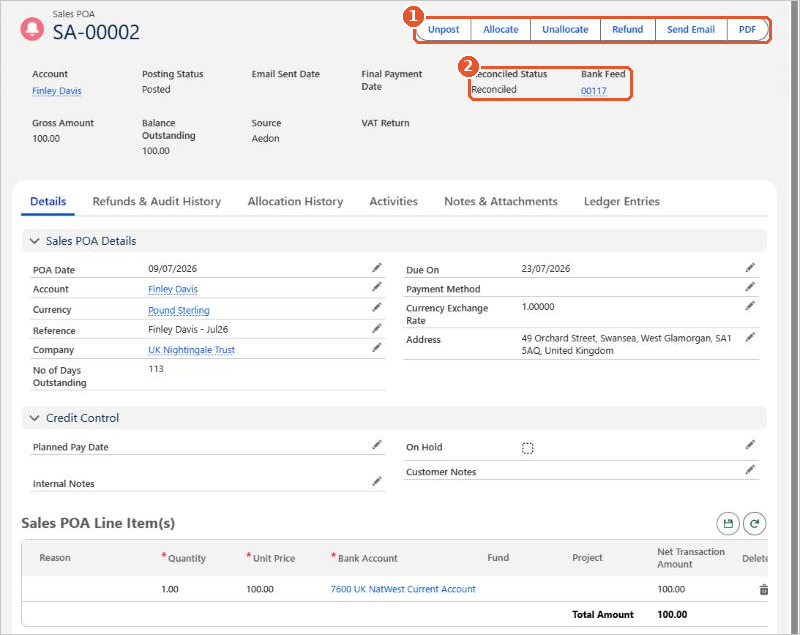
- The buttons(1) let you Unpost, Allocate, Unallocate or Refund the payment, and send or download it.
- Reconciled Status and Bank Feed(2) show whether it has been reconciled and which statement line it was matched to.
- Balance Outstanding shows how much is still to allocate or refund.
Posting rules
| Code | Transaction | Debit | Credit |
|---|---|---|---|
| SA | Sales Payment on Account | [Bank Account] | Accounts Receivable |
The debit goes to the nominal code of the bank account the money was paid into. The credit always goes to Accounts Receivable. A Sales Payment on Account has a single line.






















