
On this page
Creating a Sales Failure
Updated 31 October 2026
Create a Sales Failure when a payment you have recorded doesn’t arrive in the bank or is returned, for example a Direct Debit that is reversed.
Create a Sales Failure
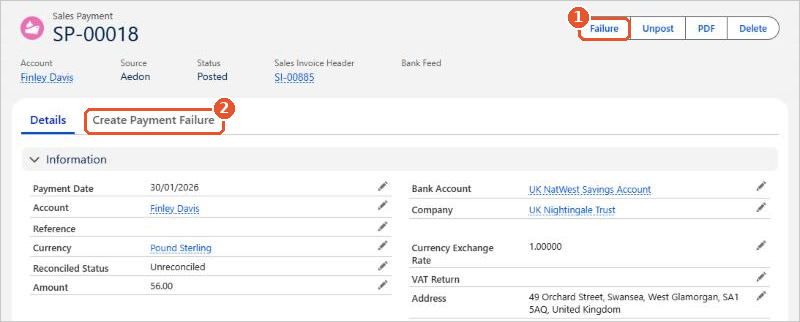
- Open the Sales Payment that failed. You can find it on the Sales Payments tab in Aedon.Sales, or from the invoice it paid.
- Check that no failure already exists for this payment. The Create Payment Failure tab(2) lists any failures already recorded against it.
- Click Failure(1).
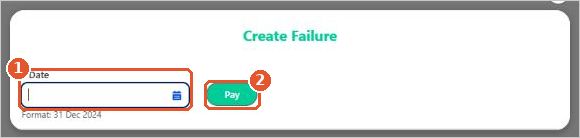
- In the Create Failure window, enter the Date the payment failed(1), usually the date it was returned on your bank statement.
- Click Pay(2) to create the failure.
Aedon creates and posts a Sales Failure for the full amount of the payment, and the amount becomes outstanding on the invoice again. When the returned payment appears on your bank statement, reconcile it on the bank account’s Reconcile tab.
If the customer then pays again, record a new Sales Payment against the invoice.






















