
UK VAT Codes (Tax Codes)
Updated 31 October 2026
Set up on the 2026 VAT codes?
This article covers the current VAT codes, such as S1, P1 and TP20. If your codes look like TAX-PUR-20, see Choosing the Right VAT Code: UK Businesses or UK Charities.
Tax codes (VAT codes) tell Aedon how much VAT to charge or reclaim on each line, and which box of the VAT return it goes in. Each company has its own set of tax codes.
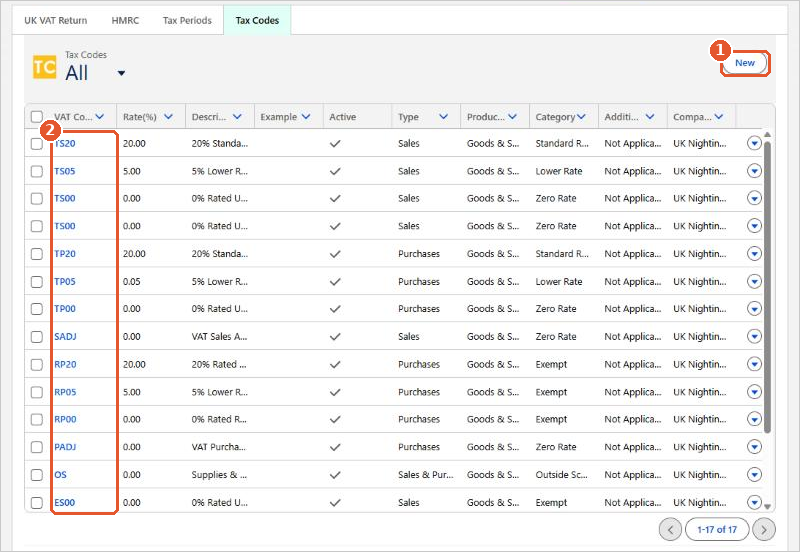
To see them, click the App Launcher (the grid of dots, top left), search for Tax and open it, then click the Tax Codes tab.
How the codes are named
The codes follow a pattern(2), for example:
- T for taxable, E for exempt and R for residual (partly exempt) purchases;
- then S for sales or P for purchases;
- then the rate, so TS20 is standard-rated sales at 20% and TP05 is lower-rated purchases at 5%;
- OS is for sales and purchases outside the scope of VAT, and SADJ and PADJ are for VAT adjustments.
Keep the list short
Make any codes your organisation doesn’t use inactive. Inactive codes don’t appear when you enter transactions, which reduces the chance of choosing the wrong one.
Tax code fields
| Field | What it does |
|---|---|
| VAT Code | The short code shown on transactions. |
| Rate(%) | The VAT rate, for example 20.00. |
| Description | Shown next to the code on transactions. |
| Example | Examples of what the code is used for. Add your own to help users choose. |
| Active | Only active codes can be used on transactions. |
| Type | Where the code can be used: Sales, Purchases, Sales & Purchases or Journals. |
| Product Type | Goods, Services or Goods & Services. |
| Category | The kind of rate: Standard, Lower, Zero, Exempt, Outside Scope and so on. This decides which VAT return boxes the code reports in. |
| Additional Category | Used for special treatments such as reverse charge and acquisition tax. Usually Not Applicable. |
| Is EC | Only needed for goods traded between Northern Ireland and the EU. |
It’s rare to need new tax codes. If you think you do, check with your accountant first. See Creating New Tax Codes.






















