
On this page
Aedon Home Page
Updated 31 October 2026
Each Aedon app opens on its Home tab, which shows a dashboard for that area of the accounts:
| App | Dashboard | What it shows |
|---|---|---|
| Aedon.Sales | Sales Home Page | Sales transactions and master data |
| Aedon.Purchases | Purchases Home Page | Purchase transactions and master data |
| Aedon.Bank | Bank Home Page | Bank transactions, statements and master data |
| Aedon.Journals | Journal Home Page | Control accounts, journals and recurring transactions |
| Aedon.Admin | Admin Home page | Integrity checks, such as control account balances, and usage information |
| Aedon.Setup | Setup Home Page | Financial and operating master data |
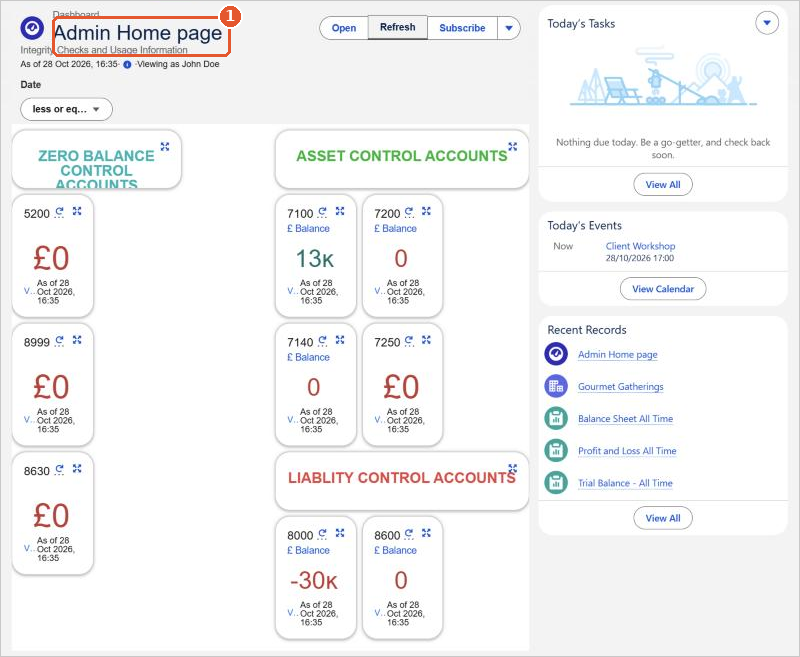
The dashboard name(1) is at the top. Click Refresh to update the figures; the date below the name shows when they were last updated. Click a chart or figure to open the report behind it. The right of the page shows your tasks, events and recently viewed records.
The home pages and dashboards are standard Salesforce features, so your Salesforce administrator can change them.
Salesforce help
For more about dashboards and home pages, see Salesforce’s own help:
- Dashboards
- Build a Lightning Experience Dashboard
- Customize Your Lightning Experience Home Page (Trailhead)






















