
On this page
Reports & Dashboards
Updated 31 October 2026
As well as the ready-made financial reports, you can use standard Salesforce reports and dashboards to analyse your accounts in any way you need. Each Aedon app has Reports and Dashboards tabs.
Report types
Almost all financial reporting is based on ledger entries. When you create a report, use one of these report types:
Click New Report on the Reports tab and search(1) to see the Aedon report types(2).
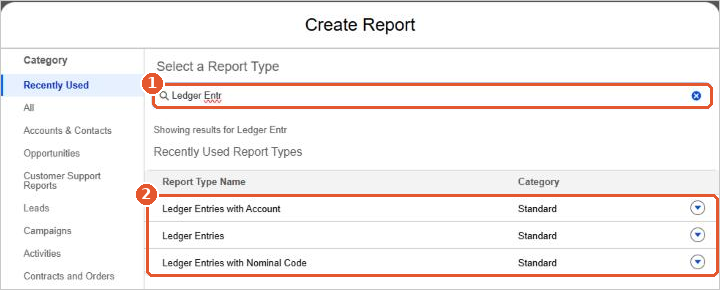
- Ledger Entries
- Ledger Entries with Nominal Code
- Ledger Entries with Account
- Ledger Entries with Product
- Ledger Entries with Bank Account
- Ledger Entries with Analysis1 to Ledger Entries with Analysis10
Comparing with budgets
Every ledger entry has a Layers value: Actual for real transactions, or the budget layer for budget journals. Group or filter a report by Layers to compare actual figures with a budget.
Salesforce help
Aedon.Accounting uses standard Salesforce reports and dashboards. For how to build and use them, see Salesforce’s own help:
- Reports and Dashboards
- Reports
- Filter Report Data
- Export a Report
- Dashboards
- Build a Lightning Experience Dashboard






















