
Connecting and Renewing Bank Feeds
Updated 31 October 2026
An automated bank feed brings your bank statement lines into Aedon.Accounting without importing files. It uses our Yapily open banking integration to connect securely and directly to your bank, with your permission. Feeds work for current and savings accounts, and for credit cards and PayPal accounts.
Connect a bank feed
- Open the Aedon.Bank app and click the Setup Bank Feeds tab. It lists the bank accounts already linked, with their Status and Reconfirm By date.
- Click Setup a bank feed.
- Choose your bank from the list.
- Read the information about what is shared and why, and continue.
- You’re taken to your bank. Log in and approve access, following your bank’s own steps.
- When you see Success, the bank account’s status changes from Inactive to Active, and Aedon starts collecting your statement lines straight away.
Watch it step by step: click through the interactive walkthrough below.
Out of date? Let us know and we’ll update the walkthrough.
When statement lines arrive
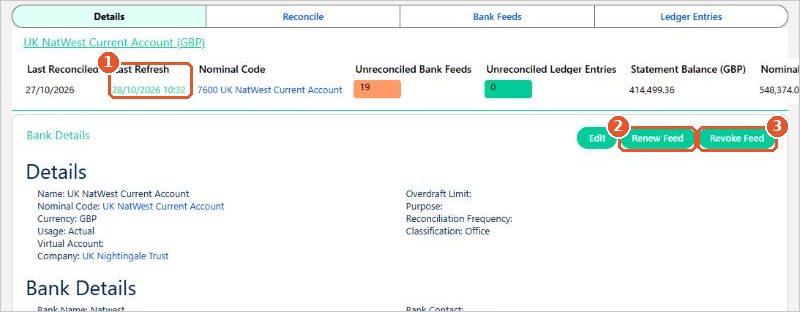
New statement lines are collected at around 8am, 11am and 3pm every day. They appear on the bank account’s Bank Feeds tab, ready to reconcile. The Last Refresh(1) on the bank account shows when the feed last ran.
Re-authorise every 90 days
For security, open banking access lasts 90 days. Before it runs out you need to give your permission again, or the feed stops. Aedon reminds you 15 days before the deadline.
- Open the bank account in Aedon.Bank.
- Click Renew Feed(2).
- Follow the steps to log in to your bank and approve access again.
Keep an eye on the date
If the feed stops, statement lines won’t arrive until you renew it. Missing lines can be imported from a file. See Importing a Bank Statement.
Stop a bank feed
To stop collecting statement lines, for example when you close a bank account, open the bank account and click Revoke Feed(3). Statement lines already collected stay in Aedon.Accounting.
Changing the times feeds are collected is a task for your Salesforce administrator.






















