
On this page
Changing a Bank Revaluation: Editing & Deleting A Bank Revaluation
Updated 31 October 2026
You can change or remove a bank revaluation until it’s posted. Once it’s posted, unpost it first.
Find the revaluation
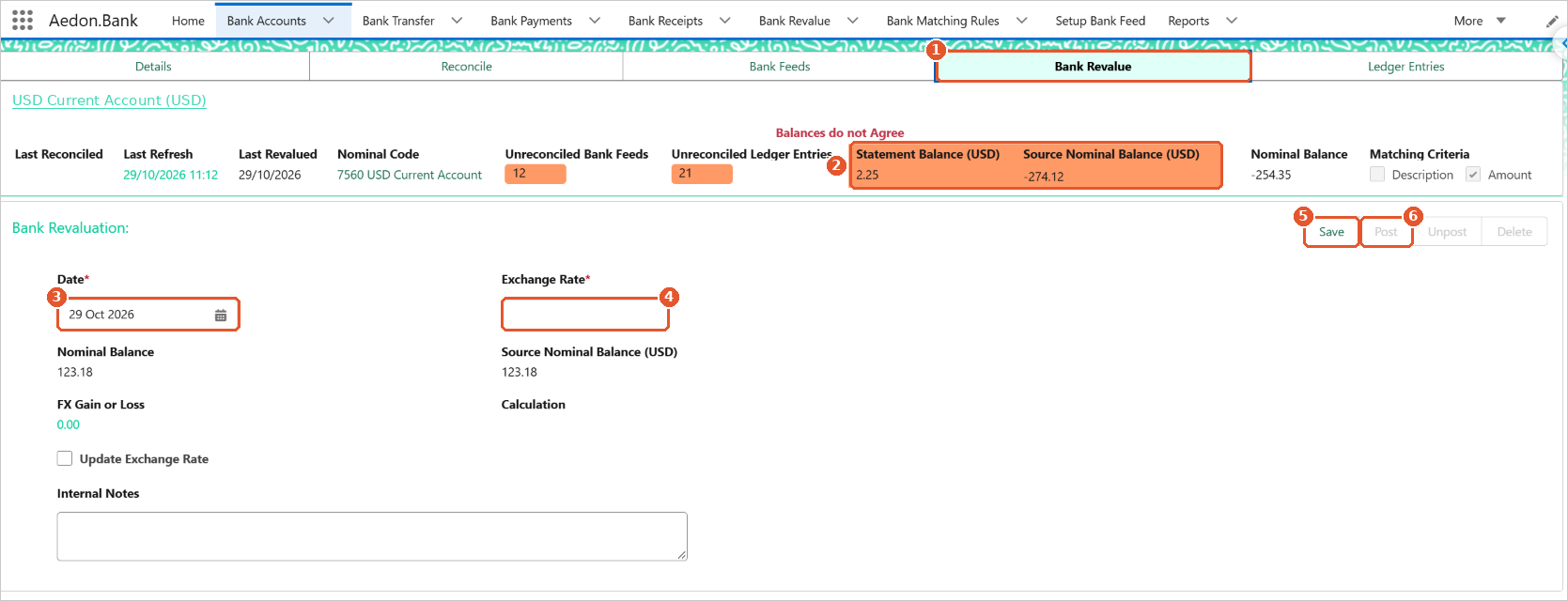
Open the bank account from the Bank Accounts tab in Aedon.Bank and click its Bank Revalue tab. You can also find every revaluation on the Bank Revalue tab in the Aedon.Bank menu.
Edit a revaluation
- If the revaluation is posted, click Unpost. This removes its Bank Gain or Bank Loss from the ledger.
- Change the Date or Exchange Rate. The FX Gain or Loss and Calculation update straight away.
- Click Save, check the figures, then click Post.
Delete a revaluation
- If the revaluation is posted, click Unpost.
- Click Delete.
Check the lock date
You can’t unpost a revaluation dated on or before the company’s lock date. See Companies.






















