
Bank Statements
Updated 31 October 2026
Your bank statement lives on the Bank Feeds tab of each bank account. It is a line-for-line copy of your bank statement, whether the lines come from the automated bank feed or are imported or added manually. Alongside each line, it shows whether that line has been reconciled to a transaction in Aedon.Accounting.
Open the bank statement
- Open Aedon.Bank, click Bank Accounts and open the bank account.
- Click the Bank Feeds tab.
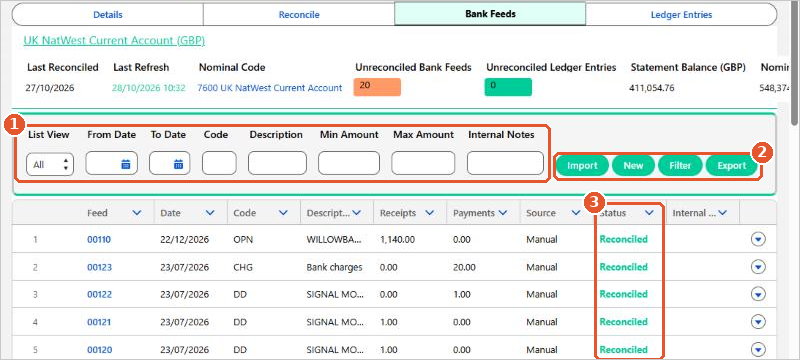
- Filters(1): if necessary, narrow the list by List View, date range, code, description, amount range or internal notes, then click Filter.
- Buttons(2): Import a bank statement file, add a New statement line manually, apply the Filter, or Export the list.
- Status(3): whether each line is Reconciled or Unreconciled.
What each column shows
| Column | What it shows |
|---|---|
| Feed | The statement line’s unique number in Aedon. It follows the line through the reconciliation. |
| Date | The transaction date from the bank statement. |
| Code | The transaction code supplied by the bank, for example BACS, DD or CHG. |
| Description | The description from the bank statement. |
| Receipts / Payments | The amount, in the bank account’s own currency. |
| Source | How the line got into Aedon, for example Import for an imported file or Manual for a line added manually. |
| Status | Reconciled or Unreconciled. |
| Internal Notes | Any notes added during the reconciliation. |
Click the arrow at the end of a row to Unreconcile a line that was reconciled by mistake. See Bank Reconciliation Process.
Check the balance first
Every time new statement lines come in, check that the Statement Balance in the bank account’s summary bar equals the closing balance on your actual bank statement. If it doesn’t, a line is missing or has been added twice, and the reconciliation can’t balance until that’s fixed.
Keep the statement matching the bank
- Don’t edit statement lines to make them match a transaction. The Bank Feeds tab should always match your bank statement exactly, so there is a clear audit trail. Correct the transaction in Aedon instead.
- Only add lines manually for genuine statement lines that didn’t come through the feed or import.
Statement balance doesn’t match your bank? If you can’t find the missing or duplicated line, please raise a case and our support team will help.






















