
Ledger Entries Explained
Updated 31 October 2026
When a transaction is posted, Aedon.Accounting records its financial effect as ledger entries: one entry for each nominal code the transaction affects, with the debit or credit. Every financial report, from the Trial Balance to your own reports, is built from ledger entries.
What a ledger entry holds
Each ledger entry record shows:
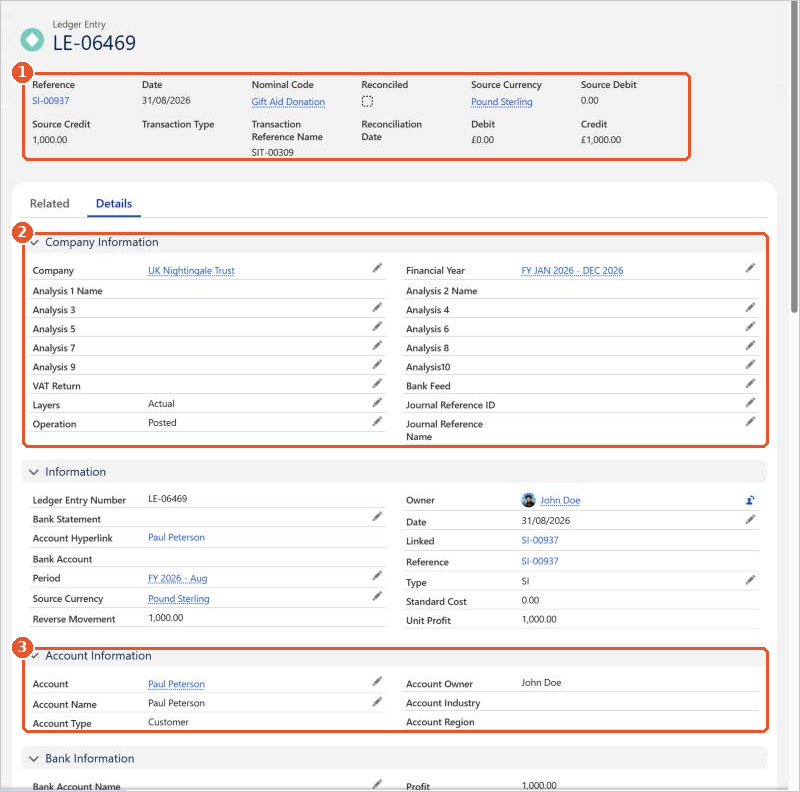
- (1) The transaction Reference, Date, Nominal Code, the Debit or Credit in the company’s base currency, and the Source Debit or Source Credit in the transaction’s own currency.
- (2) The Company, Financial Year, Analysis 1 to Analysis10, the Layers value (Actual for real transactions, or a budget layer) and the Operation.
- (3) Details copied from the account, product and bank account, such as the Account Type, Account Owner, Account Industry and Account Region.
Because these details are on every ledger entry, you can total and filter by them without any extra data entry. For example, you don’t need an analysis code to report by account region or account owner.
Ledger entry types
The Type field shows which kind of transaction created the entry:
| Sales | Purchases | Bank and journals |
|---|---|---|
| SI Sales Invoice | PI Purchase Invoice | BP Bank Payment |
| SC Sales Credit | PC Purchase Credit | BR Bank Receipt |
| SP Sales Payment | PP Purchase Payment | BT Bank Transfer |
| SA Sales POA | PA Purchase POA | BG Bank Gain |
| SR Sales Refund | PR Purchase Refund | BL Bank Loss |
| SF SP Failure | PF PP Failure | MJ Manual Journal |
| SG Sales Gain | PG Purchase Gain | BJ Budget Journal |
| SL Sales Loss | PL Purchase Loss |
Report on ledger entries
To build your own reports, use one of the ledger entry report types. The most useful are:
- Ledger Entries
- Ledger Entries with Nominal Code, for the nominal code’s P&L Class, BS Class and Group
- Ledger Entries with Account
- Ledger Entries with Product
- Ledger Entries with Analysis1 to Ledger Entries with Analysis10, for the details on each analysis code
The ready-made financial reports also use ledger entries. See Financial Reports.
Salesforce help
For how to build and filter reports, see Salesforce’s own help:






















