Viewing Your Submitted Returns
Updated 30 October 2026
You can see every VAT return you have submitted to HMRC from Aedon, and download the receipt for each one.
View submitted returns
- Click the App Launcher (the grid of dots, top left), search for Tax and open it, then click the HMRC tab.
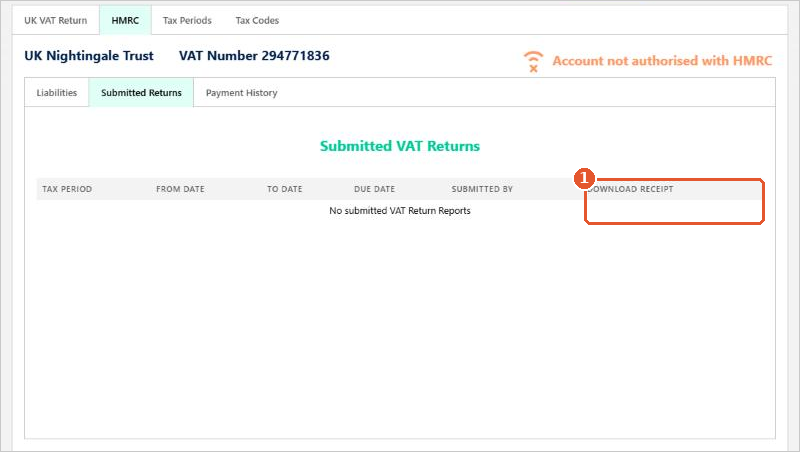
- Click Submitted Returns. The list shows each return’s tax period, dates, due date and who submitted it.
- Click the link in Download Receipt(1) to download HMRC’s receipt.
Liabilities and payments
The HMRC tab also shows what HMRC says you owe and have paid:
- Liabilities: enter a date range and click Retrieve VAT Liabilities to see the original and outstanding amount for each period.
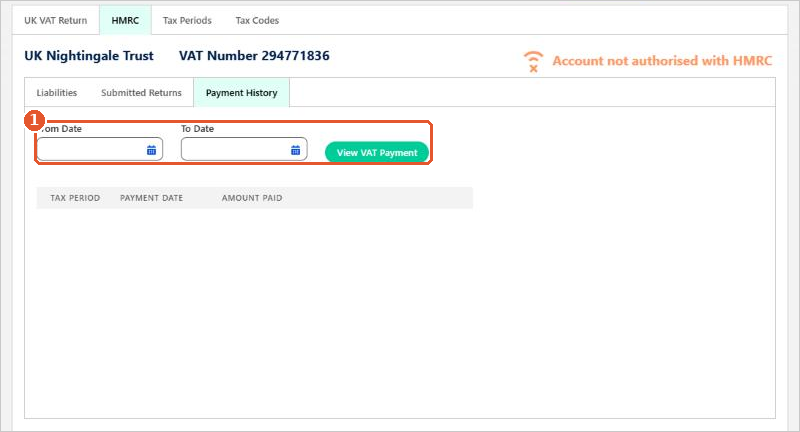
- Payment History: enter a date range and click View VAT Payment(1) to see the payments HMRC has received.
The company must be authorised with HMRC to use these tabs. See HMRC VAT Authorisation.
Related articles
More in VAT
Apportionment and Recovery Percentages: Irish Businesses
Apportionment and Recovery Percentages: Irish Charities
Choosing the Right VAT Code: Irish Businesses
Choosing the Right VAT Code: UK Businesses
Choosing the Right VAT Code: UK Charities
Creating New Tax Codes