On this page
Donor Gift Aid Statements
Updated 31 October 2026
A Gift Aid statement is a PDF summary of everything a donor gave in a UK tax year. Donors who pay higher-rate tax can use it to claim their own tax relief on their Self Assessment return.
Create a donor’s statement
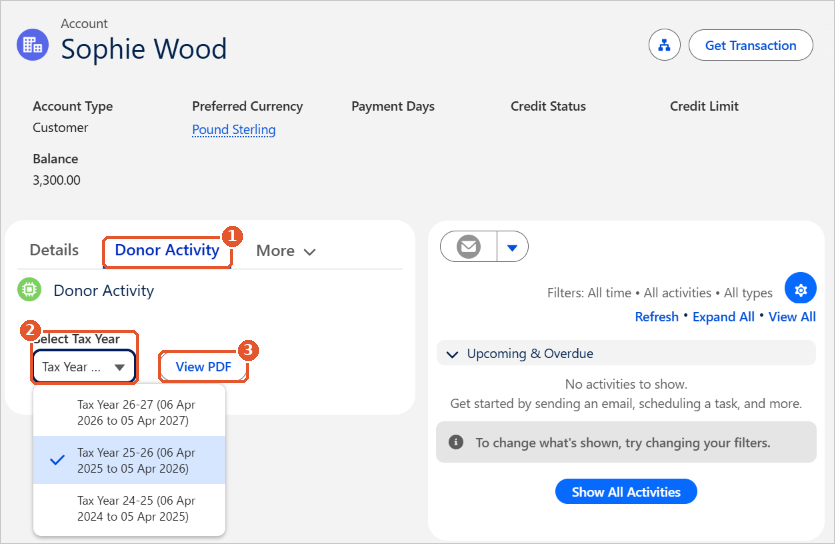
- Open the donor’s account. Search for the donor’s name in the search bar at the top of the page.
- Click the Donor Activity tab(1).
- In Select Tax Year(2), choose the tax year. Tax years run from 6 April to 5 April and are set up on the Tax Years tab in Aedon.Charities.
- Click View PDF(3). The statement opens, ready to download, print or send to the donor.
What’s on the statement
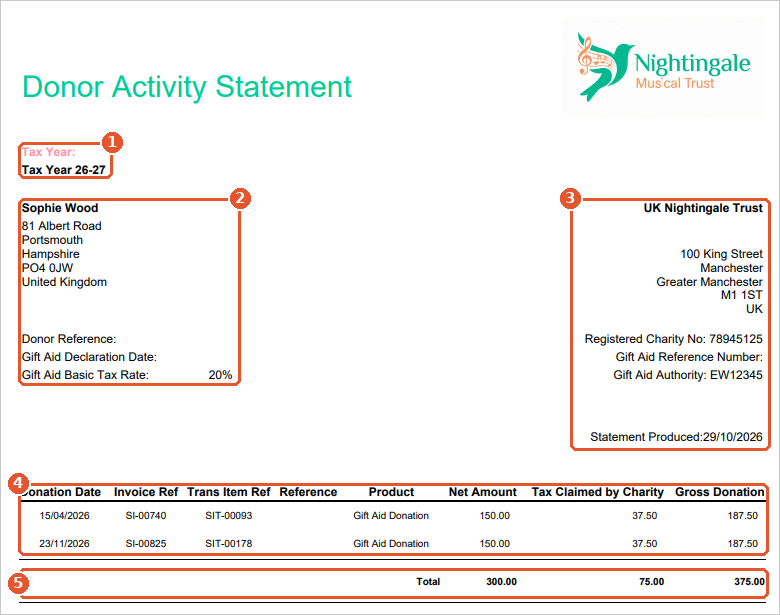
- Tax Year(1): the tax year you chose.
- Donor details(2): the donor’s name and address, their donor reference, their Gift Aid declaration date and the Gift Aid basic tax rate.
- Your charity’s details(3): your name and address, registered charity number, Gift Aid reference number and Gift Aid authority (from your company record), and the date the statement was produced.
- Donations(4): one line for each donation in the tax year, with its date, invoice reference, product, Net Amount (what the donor gave), Tax Claimed by Charity and Gross Donation.
- Total(5): the totals for the year.
The statement lists the donor’s donations in that tax year. Donations are recorded as sales invoices to the donor’s account. See Gift Aid Declarations and Eligible Products.
Related articles
More in Charities
Apportionment and Recovery Percentages: Irish Charities
Choosing the Right VAT Code: UK Charities
Claiming Gift Aid from HMRC
Getting Started with Aedon.Charities
Gift Aid Declarations and Eligible Products
Partial Exemption and Recovery Percentages: UK Charities