Sales Payment
Updated 31 October 2026
A Sales Payment records money received from a customer against a Sales Invoice. It is always allocated to an invoice. For money that isn’t for a specific invoice, use a Sales Payment on Account.
An invoice can have several Sales Payments against it, as well as Sales Credits and Sales Failures.
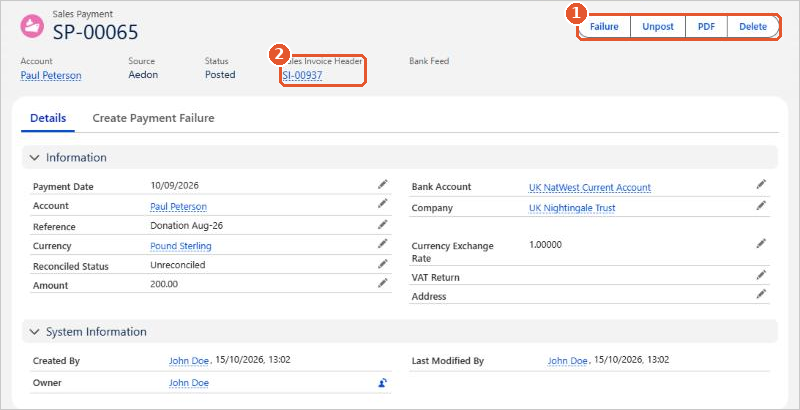
A posted Sales Payment shows the invoice it pays(2) and these actions(1):
- Failure: record that the payment has bounced or been reversed. See Creating a Sales Failure.
- Unpost and Delete: reverse or remove the payment. See Making Changes to a Sales Payment.
- PDF: create a PDF of the payment.
To see all of your Sales Payments, open Aedon.Sales and click the Sales Payments tab.
Posting rules
| Code | Transaction | Debit | Credit |
|---|---|---|---|
| SP | Sales Payment | [Bank Account] | Accounts Receivable |
The debit goes to the nominal code of the bank account the money was paid into. The credit always goes to Accounts Receivable. If the invoice has several lines, the payment creates a matching ledger entry for each line.
Related articles
Allocating a Sales Payment on Account
Converting a Sales Order into a Sales Invoice
Creating a Bulk Sales Payment
Creating a Sales Credit
Creating a Sales Failure
Creating a Sales Order