
On this page
Purchase Payment
Updated 31 October 2026
A Purchase Payment records money you have paid to a supplier against one of their invoices. It is always linked to an invoice; for money paid with no invoice to set it against, use a Purchase Payment on Account.
An invoice can have several payments against it, as well as credits and failures. To see all of your payments, open Aedon.Purchases and click the Purchase Payments tab.
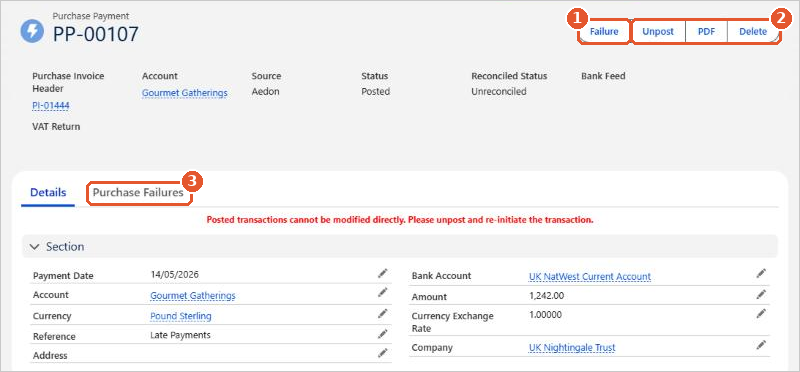
- Failure(1) records that the payment didn’t go through. See Creating a Purchase Failure.
- Unpost and Delete(2) reverse or remove the payment. See Making Changes to a Purchase Payment.
- The Purchase Failures tab(3) lists any failures recorded against the payment.
Posting rules
| Code | Transaction | Debit | Credit |
|---|---|---|---|
| PP | Purchase Payment | Accounts Payable | [Bank Account] |
The debit always goes to Accounts Payable. The credit goes to the nominal code of the bank account the payment was made from. If the invoice has several lines, the payment can create a matching ledger entry for each line.






















