
Purchase Credit
Updated 31 October 2026
A Purchase Credit (a supplier’s credit note) reduces the amount you owe a supplier, for example after a short delivery, a quality problem, a goodwill gesture or a discount.
Once it’s posted, you can allocate the credit against the supplier’s invoices, which settles that amount of them, or record a refund if the supplier pays the money back to you. It’s good practice to allocate or refund credits promptly so the purchase ledger stays tidy.
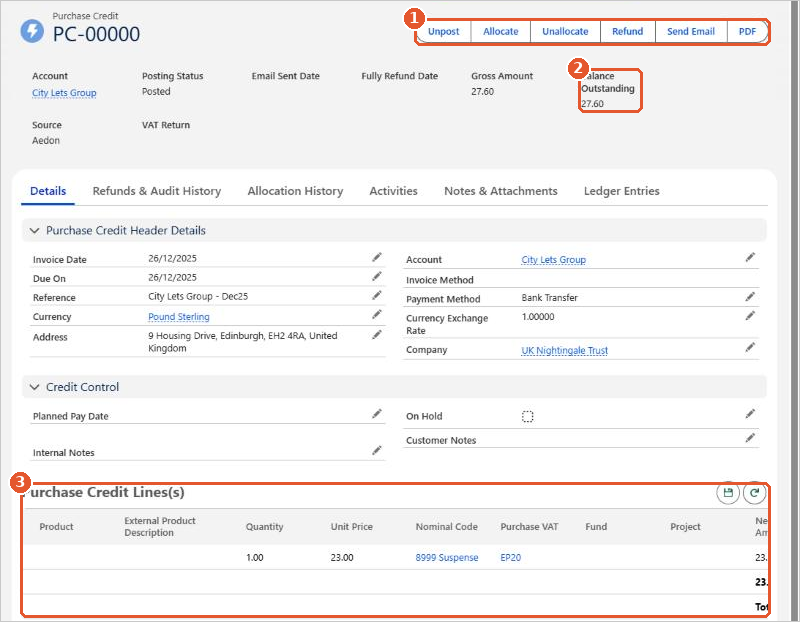
- The buttons(1) let you Unpost, Allocate, Unallocate or Refund the credit, and send or download it.
- Balance Outstanding(2) shows how much of the credit is still to use.
- Purchase Credit Lines(s)(3) show what is being credited and the nominal code each line is posted to.
Allocate it to an invoice
- Open the posted Purchase Credit and click Allocate.
- The Allocate Credit to Outstanding Invoices window lists the supplier’s unpaid invoices. Enter the amount to use against each invoice in Amount to Credit(1), and change the Date if needed.
- Check that Allocated Amount is what you expect and Remaining Credit(2) isn’t negative.
- Click Allocate(3).
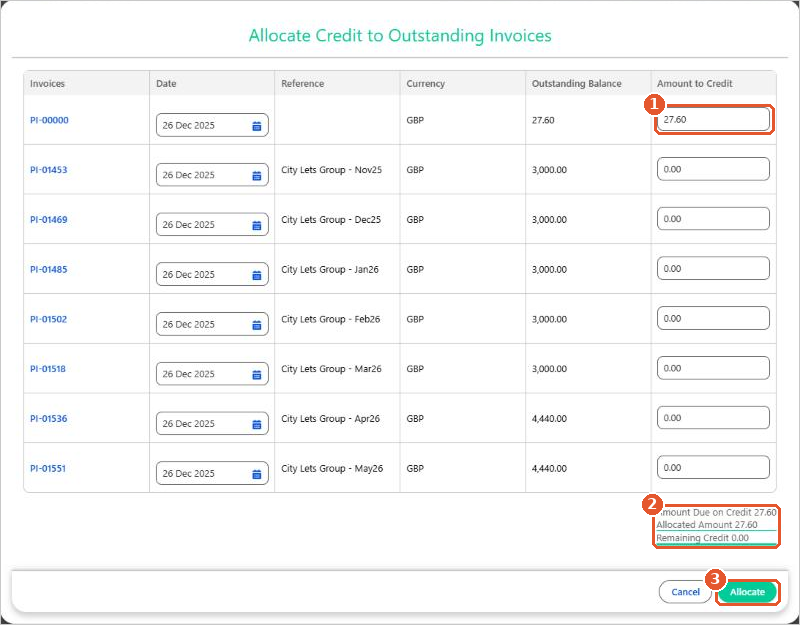
Allocating doesn’t create any new ledger entries. It reduces the balance outstanding on both the Purchase Credit and the invoice, and the Allocation History tab shows where it was used. To reverse an allocation, click Unallocate.
Record a refund
See Refunding a Purchase Credit.
Posting rules
| Code | Transaction | Debit | Credit |
|---|---|---|---|
| PC | Purchase Credit | Accounts Payable | [Nominal Code on each line]Input VAT |
A Purchase Credit is the reverse of a Purchase Invoice. The debit goes to Accounts Payable. The credit goes to the nominal code on each line and, if VAT applies, to Input VAT.






















