
On this page
Customer & Supplier Default Products
Updated 31 October 2026
A product default adds a product automatically to every new invoice for a customer or supplier. Use it for products or charges that appear on most invoices for that account, such as a monthly service charge from a supplier. It saves keying and keeps the coding consistent.
Product defaults aren’t added to recurring invoices.
Add a product default
- Open the customer or supplier from the Accounts tab.
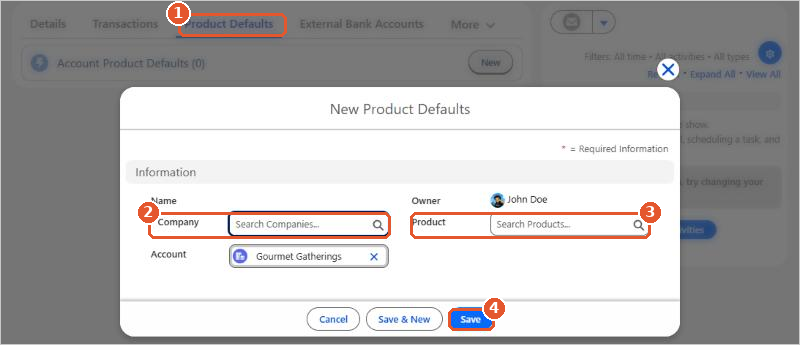
- Click the Product Defaults tab(1), then click New. The Account is filled in for you.
- Choose the Company(2) and the Product(3).
- Click Save(4), or Save & New to add another product.
To stop a product being added, delete it from the Product Defaults tab.






















