Submitting Your VAT Return
Updated 31 October 2026
Once the company is authorised with HMRC (see HMRC VAT Authorisation), you can prepare and submit your VAT return in Aedon. There are four stages:
- Create a draft VAT return.
- Review it, using the VAT Audit Report to check the figures.
- Finalise it.
- Submit it to HMRC.
Create a draft VAT return
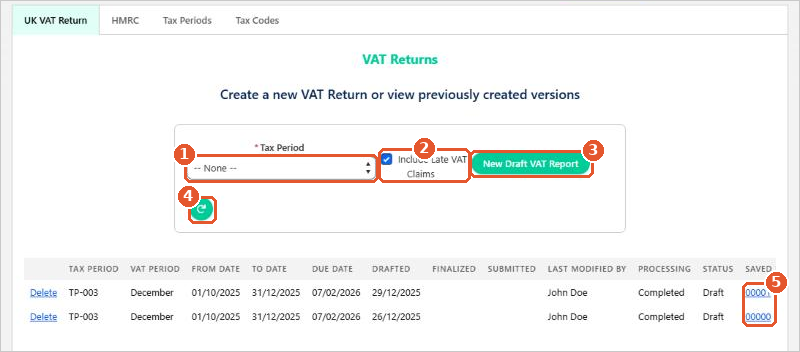
- Click the App Launcher (the grid of dots, top left), search for Tax and open it. The UK VAT Return tab opens.
- Choose the Tax Period(1).
- Leave Include Late VAT Claims(2) ticked to include transactions from earlier periods that weren’t in a previous return.
- Click New Draft VAT Report(3).
- The return is prepared in the background. Wait a few moments, then click the refresh button(4). When the Processing column shows Completed, click the number in the Saved column(5) to open the return.
Review the draft
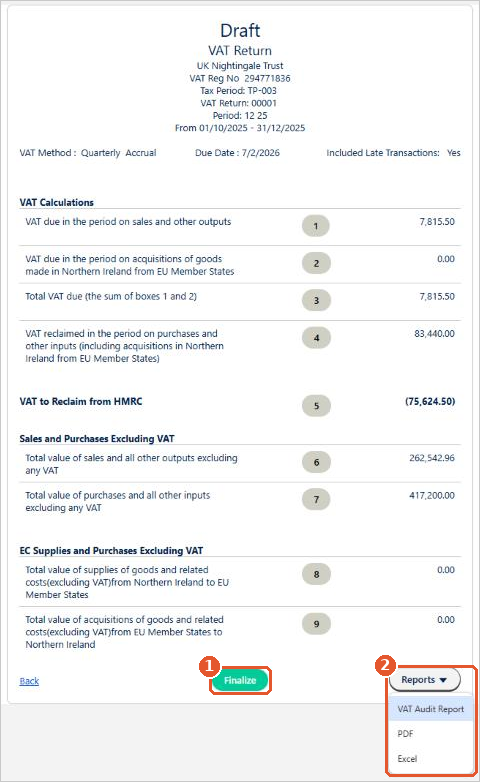
The return shows the nine VAT boxes, as on HMRC’s VAT return. Check the figures look right, then click Reports(2):
- VAT Audit Report lists every transaction behind each box, so you can spot any miscoding.
- PDF and Excel download the return itself.
If you find mistakes, correct the transactions, delete the draft from the UK VAT Return tab and create a new one.
Delete old drafts
You may need to run the draft several times while you correct the coding. Delete the old drafts as you go, so they aren’t confused with the final version.
Finalise the return
When you’re happy with the figures, open the draft and click Finalize(1). Finalising locks every transaction in the return, so they can’t be changed or unposted. This can’t be undone.
Submit the return to HMRC
- Open the finalised return and click Submit.
- Aedon connects to HMRC and shows the open VAT periods (HMRC calls them obligations). Choose the period you are submitting and confirm.
- HMRC sends back an acknowledgement receipt. You can print it, or download it later from the Submitted Returns tab. See Viewing Your Submitted Returns.
If the submission fails, please raise a case and we’ll help.
Related articles
Apportionment and Recovery Percentages: Irish Businesses
Apportionment and Recovery Percentages: Irish Charities
Choosing the Right VAT Code: Irish Businesses
Choosing the Right VAT Code: UK Businesses
Choosing the Right VAT Code: UK Charities
Creating New Tax Codes