Reverse Charge VAT: UK Businesses
Updated 31 October 2026
Written for the 2026 VAT codes
This article uses the 2026 VAT codes that new customers are set up on. If your codes look like S1, P1 or TP20, you are on the current codes: see UK VAT Codes (Tax Codes) and Moving to the 2026 VAT Codes.
This article is for UK businesses that buy services from overseas, import goods, or buy or sell building work under the construction reverse charge.
What the reverse charge is
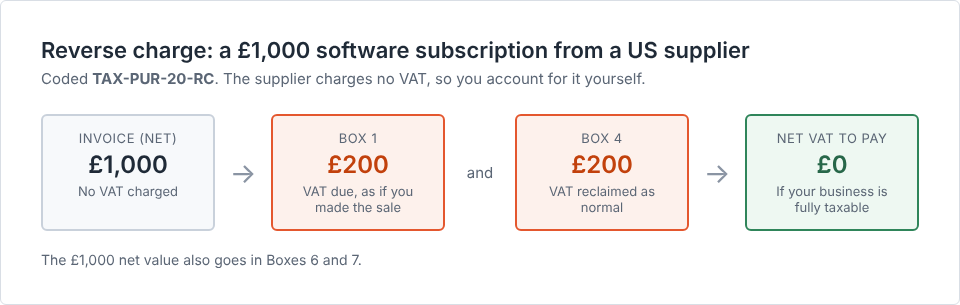
Normally your supplier charges you VAT. Under the reverse charge, the supplier charges no VAT and you account for it yourself. You put the VAT in Box 1 as if you had made the sale, and reclaim it in Box 4 as normal. If your business is fully taxable, the two cancel out.
These codes are in the International and Construction groups. If you cannot see them, please raise a case and our support team will switch the group on.
Which code to use
| What happened | Code | VAT return boxes |
|---|---|---|
| You bought services from an overseas business, such as software, advertising or consultancy | TAX-PUR-20-RC |
1, 4, 6 and 7 |
| You bought overseas services that would be zero-rated or exempt in the UK | TAX-PUR-00-SRV |
6 and 7 if zero-rated; 7 only if exempt |
| You imported goods using postponed import VAT | TAX-PUR-20-PIV |
1, 4 and 7 |
| You bought building work under the construction reverse charge | TAX-PUR-20-DRC |
1, 4 and 7 |
| You sold building work under the construction reverse charge | TAX-SAL-00-DRC |
6 |
| You sold services to an overseas business customer | TAX-SAL-NA-SRV |
6 |
HMRC treats these two differently. The reverse charge applies to services that would be zero-rated in the UK, so there’s no VAT to pay but the value still goes in Boxes 6 and 7. It doesn’t apply to services that would be exempt in the UK, so their value goes in Box 7 only. See section 5 of VAT Notice 741A.
Where the work is at 5% rather than 20%, Aedon adds the matching code, such as TAX-PUR-05-DRC.
How to enter a reverse charge purchase
- Enter the supplier’s invoice at its net value. It will show no UK VAT.
- If the invoice is in a foreign currency, convert it to sterling at the exchange rate you normally use for VAT.
- Choose the reverse charge code.
- Aedon works out the VAT and posts it to both Box 1 and Box 4.
For example, you buy £1,000 of software from a US supplier and code it TAX-PUR-20-RC. Aedon puts £200 in Box 1, £200 in Box 4, and £1,000 in Boxes 6 and 7. You pay nothing extra.
The construction reverse charge
- It applies to building and construction services under the Construction Industry Scheme, between businesses that are both registered for VAT.
- It does not apply when you sell to an end user, such as the building owner, or to an intermediary supplier who passes the work on. They must tell you in writing.
- If you sell under the reverse charge, your invoice charges no VAT, states that the reverse charge applies, and shows the VAT the customer must account for. Use
TAX-SAL-00-DRC. - If you buy under the reverse charge, use
TAX-PUR-20-DRC.
If your business is partly exempt
Use RES-PUR-20-RC for overseas services that support your shared overheads. Aedon puts the full VAT in Box 1 but reclaims only your recovery percentage in Box 4, so part of the VAT becomes a real cost.
If you use the Flat Rate Scheme
Reverse charge services are accounted for outside the scheme: the VAT goes in Box 1 and is reclaimed in Box 4, using the same codes. Postponed import VAT is added to Box 1 after the flat rate calculation, and the value of the imported goods is left out of your flat rate turnover. You can’t reclaim the import VAT in Box 4 unless the goods are a single purchase of capital goods costing £2,000 or more including VAT. See Revenue and Customs Brief 3 (2022).
Useful HMRC links
- HMRC guidance: VAT on services from abroad
- HMRC VAT Notice 741A: Place of supply of services
- HMRC VAT Notice 735: VAT domestic reverse charge procedure
- HMRC guidance: VAT domestic reverse charge for building and construction services
- HMRC guidance: VAT domestic reverse charge technical guide
- HMRC VAT Notice 700/12, section 4.6: Reverse charge accounting
Need help?
Ask your accountant whether the reverse charge applies to a transaction.
For help with Aedon.Accounting itself, please raise a case and our support team will help.
Related articles
Apportionment and Recovery Percentages: Irish Businesses
Apportionment and Recovery Percentages: Irish Charities
Choosing the Right VAT Code: Irish Businesses
Choosing the Right VAT Code: UK Businesses
Choosing the Right VAT Code: UK Charities
Creating New Tax Codes