Choosing the Right VAT Code: UK Businesses
Updated 30 October 2026
Written for the 2026 VAT codes
This article uses the 2026 VAT codes that new customers are set up on. If your codes look like S1, P1 or TP20, you are on the current codes: see UK VAT Codes (Tax Codes) and Moving to the 2026 VAT Codes.
This article is for UK businesses set up on the 2026 VAT codes.
Every transaction you enter needs a VAT code. The code tells Aedon how to treat the VAT on your VAT return. The right code first time means a correct return.
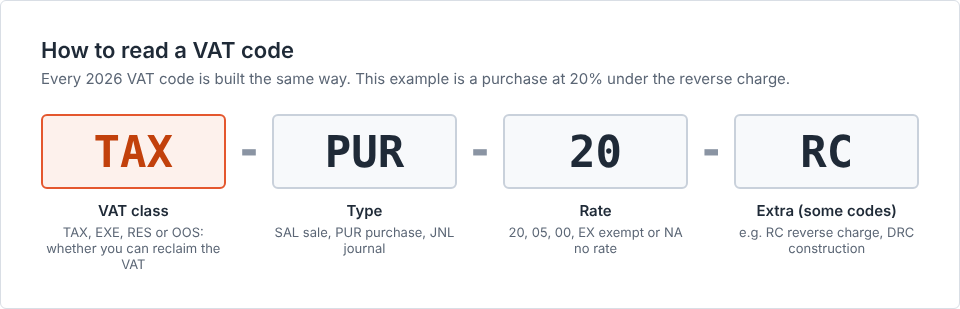
How to read a VAT code
Take TAX-PUR-20 as an example:
- TAX is the VAT class. It tells Aedon whether you can reclaim the VAT.
- PUR means a purchase. SAL means a sale, and JNL a journal.
- 20 is the VAT rate. EX means exempt, and NA means no rate applies.
A few codes have a fourth part, such as RC for reverse charge.
The four VAT classes
| VAT class | What it means | Can you reclaim the VAT? |
|---|---|---|
| TAX, Taxable | Sales that carry VAT at 20%, 5% or 0%, and what you buy to make them | Yes, in full |
| EXE, Exempt | Sales that are exempt from VAT, such as rents, insurance or finance | No |
| RES, Residual | Overheads that support both taxable and exempt sales | In part |
| OOS, Outside the Scope | Grants, wages, transfers and other items that are not sales or purchases | No VAT involved |
Your everyday codes
| Code | Use it for | Examples |
|---|---|---|
TAX-SAL-20 |
Sales at 20% | Consultancy, products, software, repairs |
TAX-SAL-05 |
Sales at 5% | Domestic fuel and power, children’s car seats |
TAX-SAL-00 |
Sales at 0% | Most food, printed books, children’s clothes |
EXE-SAL-EX |
Exempt sales | Residential rent, insurance broking, healthcare |
EXE-SAL-EX-INT |
Interest you receive | Bank and deposit interest |
OOS-SAL-NA |
Income that is not a sale | Grants with nothing given in return, insurance claims |
TAX-SAL-NA-ADJ |
Correcting sales VAT from an earlier return | See Correcting VAT below |
TAX-PUR-20 |
Purchases at 20% | Office equipment, IT, professional fees, card terminal rental |
TAX-PUR-05 |
Purchases at 5% | Children’s car seats bought to sell on |
TAX-PUR-00 |
Purchases at 0% | Food, books, train fares |
TAX-PUR-EX |
Purchases with no VAT because they are exempt | Bank charges, insurance, postage stamps, loan interest |
TAX-PUR-NA-ADJ |
Correcting purchase VAT from an earlier return | See Correcting VAT below |
OOS-PUR-NA |
Payments that are not for goods or services | Fines, donations you make |
OOS-JNL-NA |
Journals with no VAT | Wages, PAYE, transfers between accounts, dividends |
Commonly miscoded items
| Item | Use | Do not use |
|---|---|---|
| Bank charges and account fees | TAX-PUR-EX |
TAX-PUR-20 or OOS-JNL-NA |
| Card terminal rental | TAX-PUR-20, where the invoice shows VAT |
TAX-PUR-EX |
| Card transaction fees | TAX-PUR-EX, unless the invoice shows VAT |
TAX-PUR-20 |
| Interest received on bank deposits | EXE-SAL-EX-INT |
OOS-SAL-NA |
| Interest paid on loans and overdrafts | TAX-PUR-EX |
OOS-JNL-NA |
Extra codes for particular needs
Aedon switches these codes on when your account is set up, if they apply to you. If your business changes, please raise a case and our support team will switch the group on.
| Group | Switched on if you | Example code | Read more |
|---|---|---|---|
| Flat Rate Scheme | Use the VAT Flat Rate Scheme | TAX-SAL-20-FRS |
The VAT Flat Rate Scheme: UK Businesses |
| International | Buy or sell goods or services outside the UK | TAX-PUR-20-RC for services bought from overseas |
Reverse Charge VAT: UK Businesses |
| Construction | Buy or sell building work under the construction reverse charge | TAX-PUR-20-DRC |
Reverse Charge VAT: UK Businesses |
| Northern Ireland | Move goods between Northern Ireland and the EU | TAX-SAL-00-NIG |
|
| Partial exemption | Have exempt income, such as rents, insurance or finance, other than bank interest | RES-PUR-20 for shared overheads |
Partial Exemption and Recovery Percentages: UK Businesses |
Correcting VAT from an earlier return
- If a supplier sends a credit note, enter it with the same code as the original invoice.
- To correct VAT from an earlier return, post a VAT adjustment journal. Use
TAX-PUR-NA-ADJfor purchases orTAX-SAL-NA-ADJfor sales. - Enter the VAT amount. Enter a net amount only if your purchase or sales total also needs correcting.
- Record the original VAT period and the reason.
For example, a June invoice had £200 of VAT left off your return. In September, post one journal on TAX-PUR-NA-ADJ for £200 of VAT and £0 net.
Aedon warns you if your corrections for a period pass the HMRC limit. Larger errors must be reported to HMRC separately, so speak to your accountant.
If you are not registered for VAT
You do not file VAT returns, and you use three codes:
| Code | Use it for |
|---|---|
OOS-SAL-NA |
All income |
OOS-PUR-NA |
All purchases, entered at their full cost including any VAT |
OOS-JNL-NA |
Wages, transfers and journals |
Useful HMRC links
- HMRC guidance: VAT rates on different goods and services
- HMRC VAT Notice 700/12: How to fill in and submit your VAT Return
- HMRC VAT Notice 700/45: How to correct VAT errors and make adjustments or claims
- HMRC VAT Notice 706: Partial exemption
- HMRC VAT Notice 735: VAT domestic reverse charge procedure
- HMRC VAT Notice 741A: Place of supply of services
Need help?
If you are unsure which code to use, ask your accountant. A wrong code can mean reclaiming VAT you are not entitled to.
For help with Aedon.Accounting itself, please raise a case and our support team will help.
Related articles
Apportionment and Recovery Percentages: Irish Businesses
Apportionment and Recovery Percentages: Irish Charities
Choosing the Right VAT Code: Irish Businesses
Choosing the Right VAT Code: UK Charities
Creating New Tax Codes
Creating Tax Periods