
Match to Payment
Updated 31 October 2026
Match to Payment reconciles a bank statement line against transactions that are already recorded in Aedon.Accounting, such as a customer payment you have posted or a supplier payment made in a payment run. It doesn’t create any new transactions. It links the statement line to the existing ones and marks them both as reconciled.
Use it when Refresh Match hasn’t found a match for you, for example because the amount or description on the bank statement is different, or because one statement line covers several transactions.
What you can match
| Money in (receipts) | Money out (payments) |
|---|---|
| Sales Payments | Purchase Payments |
| Sales Payments on Account | Purchase Payments on Account |
| Bank Receipts | Bank Payments |
| Bank Transfers (in) | Bank Transfers (out) |
| Purchase Refunds | Sales Refunds |
| – | Sales Failures |
If the transaction isn’t in Aedon yet, create and post it first, then come back and match it. If it’s an unpaid invoice with no payment recorded, use Match to Invoice instead, which creates the payment for you.
Match a statement line to a payment
- Open Aedon.Bank, click Bank Accounts, open the bank account and click the Reconcile tab.
- Click the arrow in the Actions column for the statement line and choose Match to Payment.
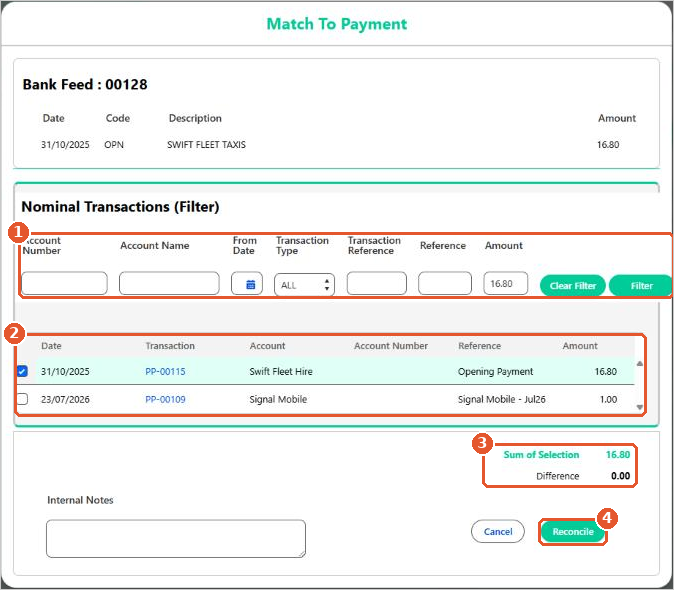
- If necessary, use the filters(1) to find the transaction and click Filter. The Amount is filled in with the statement line amount.
- Tick the transaction(2). Transactions for exactly the same amount as the statement line are highlighted in green.
- Check that Sum of Selection has turned green and the Difference is 0.00(3).
- Add any Internal Notes, then click Reconcile(4).
One statement line covering several payments
A single bank line often covers more than one transaction, for example a BACS payment run to several suppliers or a batch of card receipts. Tick each transaction that makes up the line. Aedon adds them up as you go. In this example, a BACS payment run of 3,444.60 paid three suppliers on the same day.
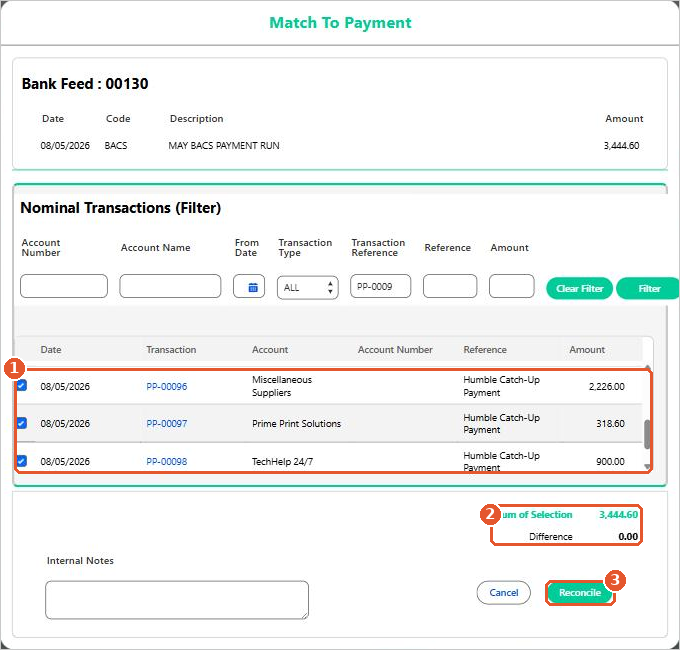
- The Sum of Selection(2) shows the total of the ticked transactions(1).
- The Difference shows how much is left to find. A negative difference means you have ticked more than the statement line.
- Both stay orange, and Reconcile stays unavailable, until the difference is exactly 0.00. Then they turn green and you can click Reconcile(3).
Exact matches only
Match to Payment always needs an exact match. If the transactions don’t add up to the statement line, don’t force it: correct the original transaction, or create the missing one, and then match again.
Bank transfers
A transfer between two of your own bank accounts appears on both bank statements, so it needs reconciling in both bank accounts: the money going out of one, and the money coming in to the other.
Still can’t match it? If you have checked the transaction exists, has been posted and is for the right amount, and it still won’t match, please raise a case and our support team will help.






















