
On this page
Purchase Invoice
Updated 31 October 2026
A Purchase Invoice records a bill from a supplier: what you bought, how much you owe and when it’s due. Posting it adds the amount to Accounts Payable, and paying it settles the balance.
You can create a Purchase Invoice in several ways:
- manually, from the Purchase Invoices tab in Aedon.Purchases. See Creating a Purchase Invoice;
- by converting a Purchase Order;
- from a Recurring Purchase Invoice schedule;
- by importing several invoices at once with Import Transactions on the Purchase Invoices list.
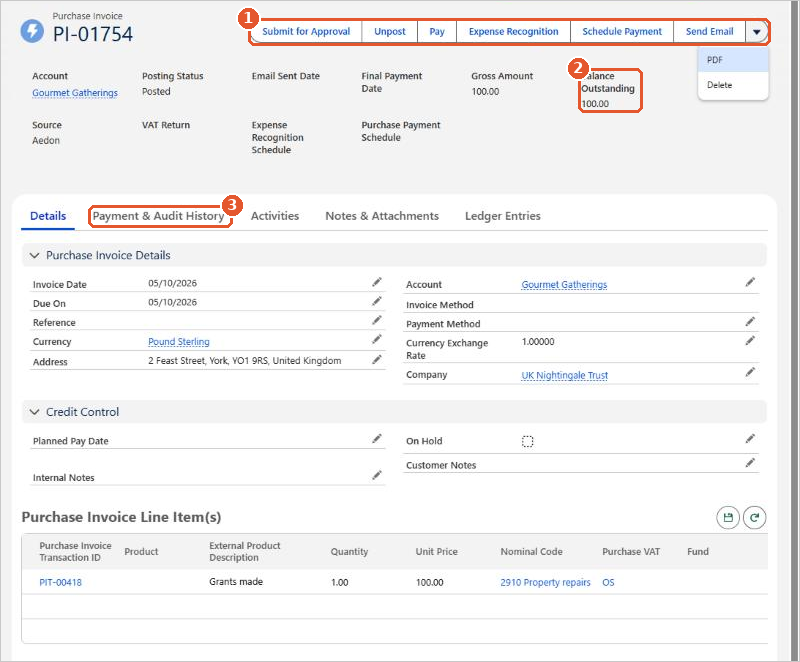
- The buttons(1) let you Unpost the invoice, Pay it, set up Expense Recognition or a Schedule Payment, and send it by email. PDF and Delete are in the drop-down menu.
- Balance Outstanding(2) shows how much is still to pay.
- The Payment & Audit History tab(3) lists the payments, credits and failures against the invoice.
Posting rules
| Code | Transaction | Debit | Credit |
|---|---|---|---|
| PI | Purchase Invoice | [Nominal Code on each line]Input VAT | Accounts Payable |
The debit goes to the nominal code on each line and, if VAT applies, to Input VAT. The credit always goes to Accounts Payable.






















