Credit Terms and Invoice Due Dates
Updated 31 October 2026
Each customer and supplier has credit terms that set when their invoices fall due. Aedon uses them to fill in the Due On date of every new sales and purchase invoice, which drives your aged debtor and creditor reports and your payment runs.
The credit terms fields
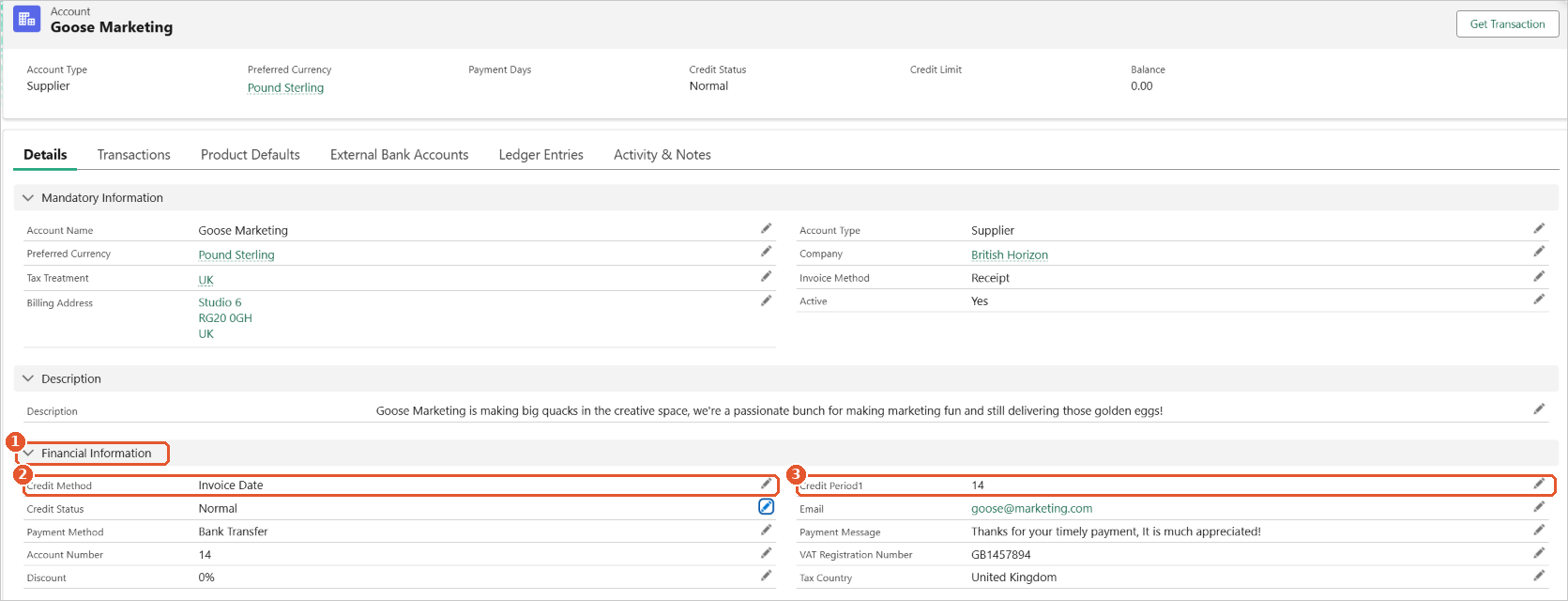
Credit terms are set on the account’s Details tab, in the Financial Information section(1). Click the pencil icon next to a field to change it, then click Save. To open an account and change its fields, see Customers & Suppliers.
- Credit Method(2): where the credit period starts from. Invoice Date counts from the date of the invoice. Month End counts from the last day of the month the invoice is dated in.
- Credit Period1(3): the number of days’ credit you give or get. Enter
0for invoices that are due straight away.
How the due date is worked out
For an invoice dated 10 October with a credit period of 30 days:
| Credit Method | Calculation | Due On |
|---|---|---|
| Invoice Date | 10 October + 30 days | 9 November |
| Month End | 31 October (end of the invoice’s month) + 30 days | 30 November |
With a credit period of 0, an invoice is due on its invoice date (Invoice Date) or on the last day of its month (Month End).
Changing an account’s terms
New credit terms apply to invoices you create after the change. Invoices already on the account keep their Due On date.
Related articles
Allocating a Sales Payment on Account
Converting a Sales Order into a Sales Invoice
Creating a Bulk Sales Payment
Creating a Sales Credit
Creating a Sales Failure
Creating a Sales Order
Allocating a Purchase Payment on Account
Converting a Purchase Order into a Purchase Invoice
Creating a Bulk Purchase Payment
Creating a Purchase Credit
Creating a Purchase Failure
Creating a Purchase Invoice